
Integrations
Connect to external APIs with OAuth and configuration management
Integrations are the bridge between Bifrost and external APIs. They combine OAuth credentials, configuration, and organization-specific settings into a unified system.
What Are Integrations?
Section titled “What Are Integrations?”An integration represents a connection to an external service like Microsoft Graph, HaloPSA, or any REST API. Each integration can have:
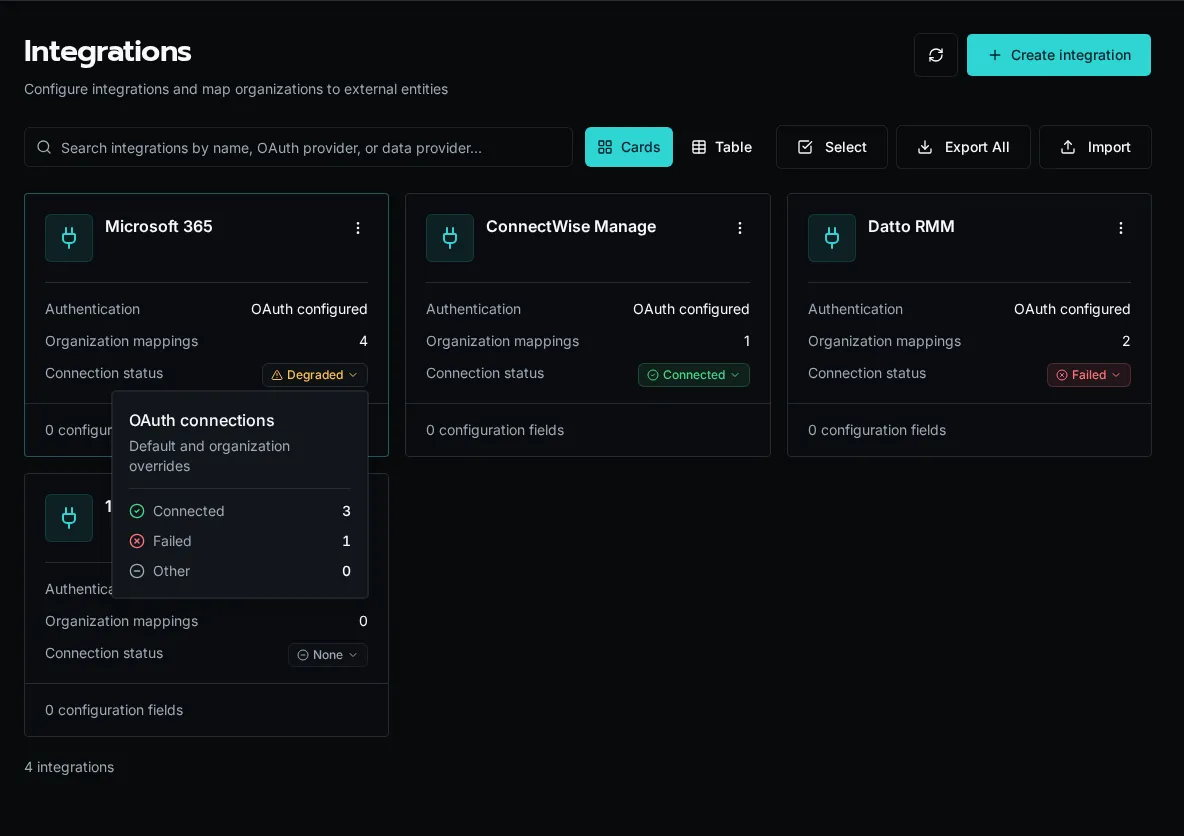
For OAuth integrations, the list rolls the default connection and organization overrides into one status. Connected means every connection is healthy, Degraded means the integration has both healthy and failed connections, Failed means every connection failed, and None means no connection exists. Select the status to open the connection-count breakdown.
Integrations provide:
- OAuth credentials - Access tokens managed by Bifrost
- Configuration - API keys, base URLs, timeouts
- Entity mapping - Organization-specific tenant IDs or company IDs
- Generated SDK - Auto-generated Python client from OpenAPI spec
Two-Level Configuration
Section titled “Two-Level Configuration”Integrations support configuration at two levels:
| Level | Scope | Use Case |
|---|---|---|
| Integration defaults | All organizations | Base URLs, default settings |
| Organization overrides | Single organization | Tenant-specific IDs, custom endpoints |
When your workflow requests an integration, Bifrost merges defaults with org-specific overrides:
from bifrost import integrations
# Get merged configurationintegration = await integrations.get("HaloPSA")base_url = integration.config.get("base_url")  # Merged from defaults + orgtenant_id = integration.entity_id               # Org-specific
OAuth Management
Section titled “OAuth Management”Integrations replace the legacy oauth module with better organization:
# Old approach (deprecated)# from bifrost import oauth# conn = await oauth.get("Microsoft_Graph")
# New approachfrom bifrost import integrations
integration = await integrations.get("Microsoft_Graph")if integration and integration.oauth: token = integration.oauth.access_tokenEntity Mapping
Section titled “Entity Mapping”For multi-tenant APIs, integrations track external entity IDs per organization:
| Field | Description |
|---|---|
entity_id |
The external ID (tenant_id, company_id) |
entity_name |
Display name for the entity |
Why entity_id matters
Section titled “Why entity_id matters”entity_id is the routing key for org-scoped OAuth and API calls. Each IntegrationMapping is a (org_id, integration_id, entity_id) triple, and the entity_id becomes the connection identity downstream API calls use to address the right tenant or customer record:
- Microsoft Graph →
entity_idis the Entra IDtenant_id - HaloPSA →
entity_idis the HaloPSAcompany_id - ConnectWise / Autotask →
entity_idis the customer/company key
A single integration can serve many Bifrost organizations because each one carries its own entity_id in its mapping. Without that mapping, every org would share one set of credentials and target one external tenant — defeating the per-customer scoping that MSPs need.
Bifrost Org │ ▼IntegrationMapping(entity_id, oauth_token) │ ▼External API call (scoped to entity_id)This enables one integration to serve multiple tenants:
# Each org has its own HaloPSA tenantintegration = await integrations.get("HaloPSA")tenant_id = integration.entity_id # "customer-123" for this orgConfig Schema
Section titled “Config Schema”Integrations define a schema for configuration values:
# Example schema[ {"key": "base_url", "type": "string", "required": True}, {"key": "api_key", "type": "secret", "required": True}, {"key": "timeout", "type": "int", "required": False}]Supported types:
string- Text valuesint- Integer valuesbool- Boolean flagsjson- Complex JSON objectssecret- Encrypted sensitive data
SDK Generation
Section titled “SDK Generation”Integrations can auto-generate Python SDKs from OpenAPI specs:
- Provide an OpenAPI spec URL
- Select authentication method (OAuth, API key, etc.)
- Bifrost generates a typed Python client
- Use the client in workflows with zero-config auth
# Generated SDK auto-authenticates via integrationfrom modules import example_api
result = await example_api.list_resources()  # Auth handled automatically
Access in Workflows
Section titled “Access in Workflows”from bifrost import workflow, integrationsimport httpx
@workflowasync def sync_data(): # Get integration with merged config and OAuth integration = await integrations.get("ExternalAPI")
if not integration: return {"error": "Integration not configured"}
# Use OAuth token headers = {} if integration.oauth: headers["Authorization"] = f"Bearer {integration.oauth.access_token}"
# Use config values base_url = integration.config.get("base_url")
async with httpx.AsyncClient() as client: response = await client.get(f"{base_url}/data", headers=headers) return response.json()Next Steps
Section titled “Next Steps”- Creating Integrations - Setup guide
- SDK Generation - Generate API clients
- Integrations Module - SDK reference