
Workflows
Understanding workflows in Bifrost
What Are Workflows?
Section titled “What Are Workflows?”Workflows are Python functions whose decorators describe their functionality to the platform. The Workflows page shows all available workflows organized by category.
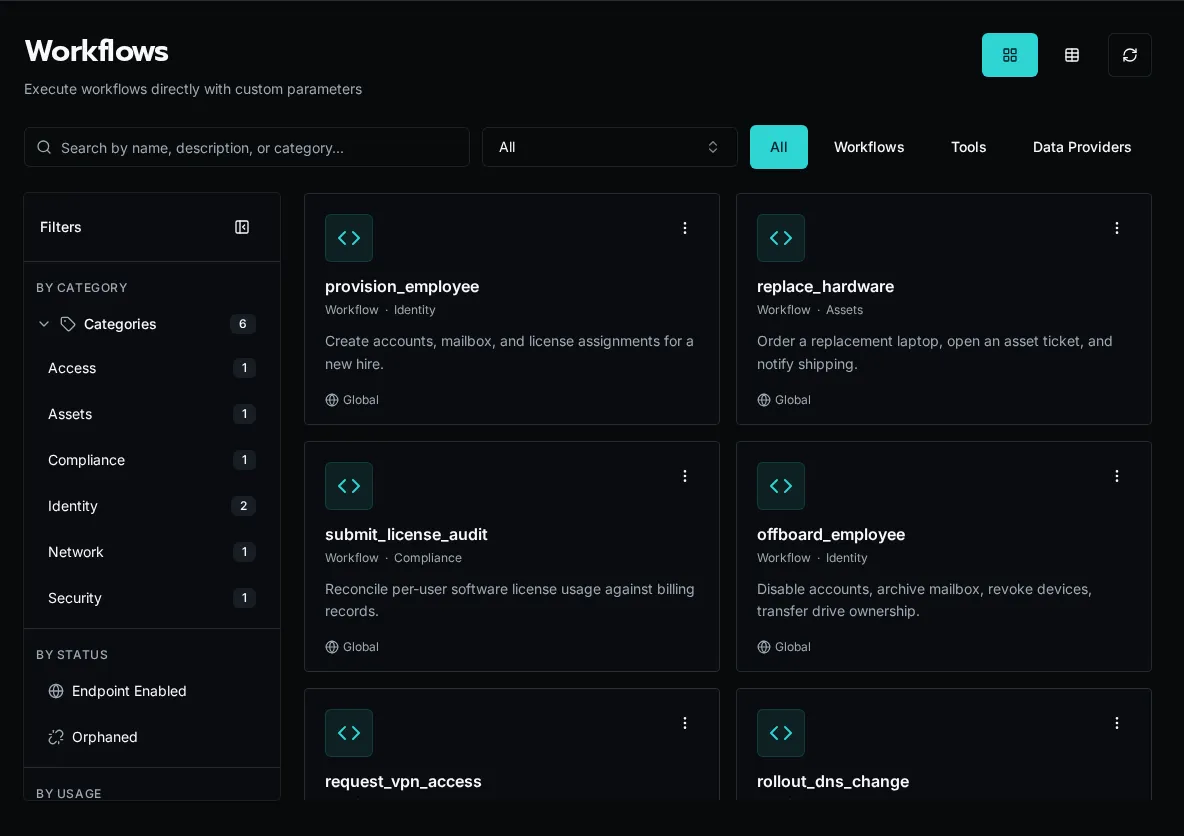
Workflows allow you to:
- Define and accept parameters that can be exposed through forms or API calls
- Execute business logic
- Return results
- Are registered explicitly via Code Editor, CLI, API, or an MCP agent
How They Work
Section titled “How They Work”from bifrost import workflow
@workflowasync def create_user(email: str, name: str): """Create a new user in the system.""" # Business logic here return {"user_id": "123"}The decorator automatically infers:
- name: from the function name (
create_user) - description: from the docstring
- parameters: from the function signature (type hints determine field types)
Any runtime controls such as timeouts, endpoint exposure, and recurring schedules are configured on the workflow record or via event sources after registration.
Workflow lifecycle:
- Developer writes Python function with
@workflowdecorator - Developer registers the function via Code Editor, CLI, API, or an MCP agent
- Workflow appears in the UI
- Admins will usually create forms and tie them to workflows for execution
- Users execute via forms
- Results logged and displayed in realtime
Key Concepts
Section titled “Key Concepts”Registration
Section titled “Registration”Workflows require explicit registration after creating the file. Write your code, then register the function using the Code Editor, bifrost workflows register, the POST /api/workflows/register endpoint, or an accessible MCP agent’s workflow-registration tool.
Workflow files live in the _repo/ workspace in object storage. Bifrost indexes registered metadata in the database and caches executable Python modules for workers; object storage remains the source of truth.
_repo/├── user_management.py├── license_automation.py└── reporting.pySee Workflow Registration for details on the registration process.
Parameters
Section titled “Parameters”Parameters are automatically extracted from your function signature:
@workflowasync def create_user( email: str, # Required string name: str, # Required string department: str = "IT", # Optional with default active: bool = True # Optional boolean): """Create a new user.""" passTo use a data provider for a parameter, configure it in the form builder by selecting the data provider for the field. The form will populate the dropdown dynamically while the workflow receives the selected value:
@workflowasync def create_user(email: str, department: str): """Create a new user.""" passExecution Context
Section titled “Execution Context”Every workflow receives ExecutionContext:
- Current user info
- Organization context
Invocation surfaces
Section titled “Invocation surfaces”Workflows can be triggered from several places:
- Forms
- API calls
- HTTP endpoints, when enabled in workflow settings
- Event sources, including recurring schedule sources
The decorator itself only carries the metadata needed for discovery. Runtime behavior lives in the workflow record or the event source that points at it.
Workflow Categories
Section titled “Workflow Categories”Organize workflows by purpose, defined completely by the developer.
Multi-Tenancy
Section titled “Multi-Tenancy”Workflows are organization-aware:
- Access organization-specific data via
context.org_idorcontext.organization - Use organization-scoped secrets and config
@workflow(name="get_org_data")async def get_org_data(context): # Automatically scoped to current org data = await db.query( "SELECT * FROM data WHERE org_id = ?", context.org_id ) return {"data": data}Workflow vs Form
Section titled “Workflow vs Form”Workflow: Backend Python function (business logic) Form: Frontend UI (user input collection)
Workflows can be:
- Executed directly via API
- Triggered by forms
- Triggered automatically by event sources
- Called from other workflows
Forms always execute workflows, but workflows don’t require forms.
State & Logging
Section titled “State & Logging”Workflows are stateless but:
- Log progress with Python logging
- Return results
- Use external storage for state
- Capture runtime varialbes for troubleshooting purposes
import logging
logger = logging.getLogger(__name__)
@workflow(name="process_items")async def process_items(context, items: list):    logger.info(f"Processing {len(items)} items")
    for i, item in enumerate(items):        logger.info(f"Processing item {i+1}/{len(items)}")        # Process item
    return {"processed": len(items)}
Logs appear in execution detail view.
Error Handling
Section titled “Error Handling”Workflows return error states (don’t raise exceptions):
@workflow(name="example")async def example(context, param: str): try: result = await do_work(param) return {"success": True, "result": result} except Exception as e: return {"success": False, "error": str(e)}This allows:
- Partial success tracking
- User-friendly error messages
- Execution history
Security
Section titled “Security”Workflows inherit user permissions:
- Run as executing user
- Access org-scoped resources only
- Permission checks can be done via the context
@workflow(name="admin_task")async def admin_task(): # Check permissions in the workflow if not context.is_platform_admin: return {"error": "Admin privileges required"} # Perform admin operation passNext Steps
Section titled “Next Steps”- Build Your First Workflow - Hands-on tutorial
- Writing Workflows Guide - Complete guide
- Platform Overview - Architecture