
Update Deployed App SDKs
Rebuild deployed V2 Apps against the web SDK shipped by the current Bifrost instance without redeploying their backing resources.
A Bifrost upgrade does not silently replace the SDK inside an already deployed App. Bifrost compares each active V2 App build with the SDK on the current instance and shows when an update is available.
Update Apps from the UI
Section titled “Update Apps from the UI”-
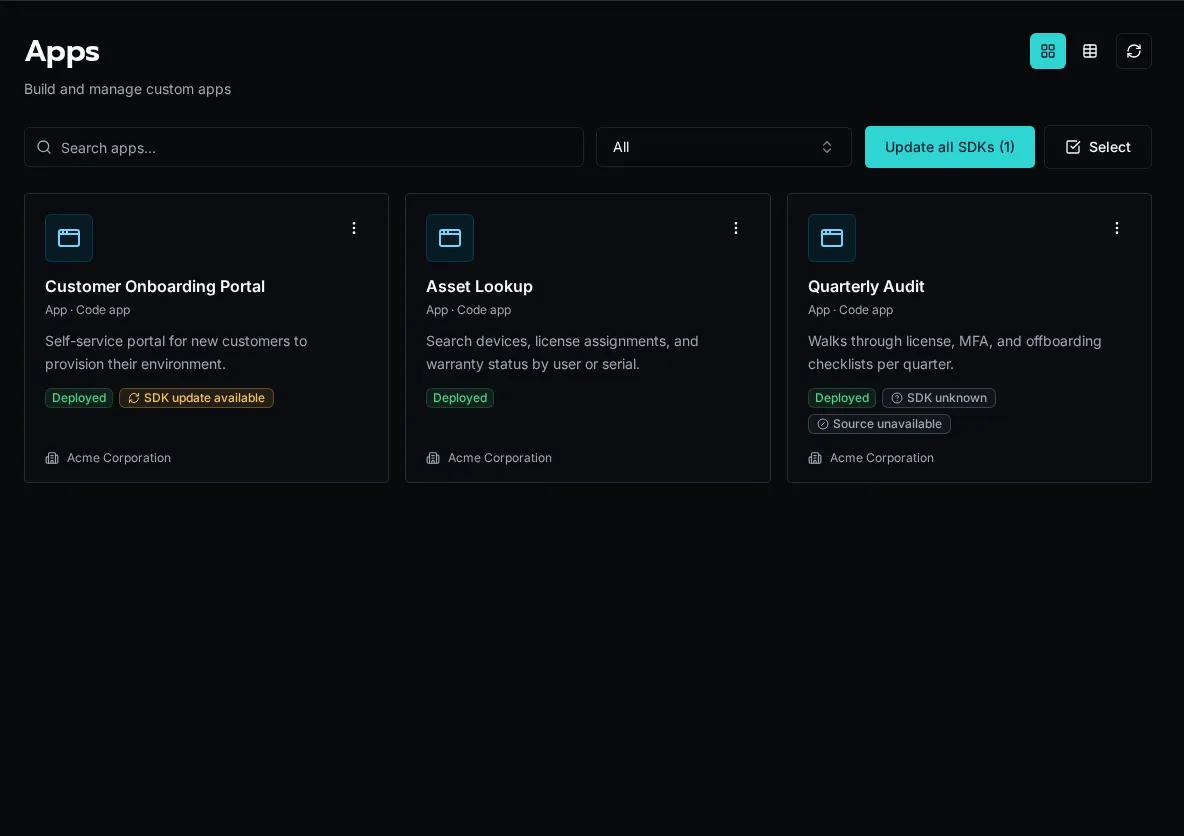
Open Apps as a platform administrator. Apps built with an older SDK show SDK update available; deployments without recorded SDK provenance show SDK unknown.
-
Choose Update SDK from one App’s actions menu, click Update all SDKs, or click Select to update a subset.
-
Follow progress in the App badge and Notifications. Bifrost builds a replacement artifact and switches the active deployment only after the build succeeds. A failed update leaves the previous deployment active and offers a retry.
Update Apps in a Solution
Section titled “Update Apps in a Solution”Open Solutions to see the number of Apps with SDK updates in each install. Use the refresh action on one Solution, select several installs, or choose Update all SDKs. You can also update the Apps from a Solution’s detail page.
An SDK-only update rebuilds the affected App artifacts from the retained deployed Solution archive. It does not pull Git, change the Solution version, reconcile the manifest, or modify sibling resources.
Use the CLI
Section titled “Use the CLI”Inspect and update independent or otherwise visible Apps:
bifrost apps sdk statusbifrost apps sdk status <app>bifrost apps sdk update <app>bifrost apps sdk update --allFrom a bound Solution workspace, inspect or rebuild the deployed install’s Apps:
bifrost solution sdk deployed-statusbifrost solution sdk deployed-updatebifrost solution sdk update is different: it refreshes the SDK installed in the local development workspace.
Resolve source-unavailable Apps
Section titled “Resolve source-unavailable Apps”An App can be rebuilt only when Bifrost retained suitable deployment source. If the UI shows Source unavailable, redeploy the independent App or Solution from its source first. Bifrost 1.4 retains a sanitized archive from that deployment, excluding secrets, dependencies, build output, caches, and version-control data; later SDK updates can then rebuild in place.
Read the SDK statuses
Section titled “Read the SDK statuses”| Status | Meaning |
|---|---|
| SDK current | The active App uses the SDK bytes shipped by this Bifrost instance. |
| SDK update available | A different SDK is available and retained source can be rebuilt. |
| SDK unknown | The deployment predates SDK provenance or its SDK metadata is incomplete. Rebuild it when source is available. |
| Source unavailable | Bifrost cannot perform an SDK-only rebuild; redeploy from source. |